Using yabai without disabling SIP
By Sheik Ahamed, who makes Findow. Checked on 31 October 2026. All guides
Short answer: yes, yabai runs with System Integrity Protection on. SIP is optional. You keep automatic tiling but lose features that need its scripting addition, such as moving or creating spaces, window transparency, scratchpads, sticky windows and window layers.
Why SIP comes up at all
SIP is the macOS protection that stops even an admin user changing core parts of the system. yabai's extra features work by injecting a scripting addition into Dock.app, and SIP blocks that. So the project's README calls partly disabling it optional. The author makes no recommendation either way and sets out the risks.
Partly disabling it isn't a quick toggle. The wiki has you boot into recovery, run csrutil with flags that depend on your Mac and macOS version, and, on Apple silicon, set a boot argument as well. Apple also turns SIP back on during repairs, so you'd have to do it again afterwards. Many people, and many company Macs, won't accept that. The good news is that you can leave it on and still get what most people want from yabai.
What works and what doesn't
| Feature | SIP on | Scripting addition needed |
|---|---|---|
| Automatic tiling (bsp layout) | Yes | No |
| Focus, swap and warp windows | Yes | No |
| Resize and float windows | Yes | No |
| Move, swap, create or destroy spaces | No | Yes |
| Remove window shadows | No | Yes |
| Window transparency | No | Yes |
| Window animations | No | Yes |
| Scratchpad windows | No | Yes |
| Window layers, such as always on top | No | Yes |
| Sticky windows on all spaces | No | Yes |
| Toggle picture-in-picture | No | Yes |
The bottom part of the table comes from yabai's own list of features that need SIP partly disabled. The wiki doesn't give an item-by-item list for the top part, so read it as "not on that list". The Commands page does say its example for focusing a space works with SIP either on or off.
Set up yabai with SIP on
- Install it with Homebrew: brew install asmvik/formulae/yabai
- Start it: yabai --start-service
- Allow it when macOS asks. It's in System Settings > Privacy & Security > Accessibility, and you can add it with the + button.
- Turn on tiling for a space: yabai -m space --layout bsp
- Add the same setting to your yabairc so it stays on. The wiki's Configuration page explains where the file goes.
Skip the "Configure scripting addition" steps in the wiki. They only apply if you've changed SIP.
Add shortcuts
yabai has no keys of its own. You control it from the command line, so you'll want skhd, which its README points to, or another hotkey tool. Bind your keys to commands such as yabai -m window --focus west and yabai -m window --swap east. Only tiled windows can be swapped. Use yabai -m window --toggle float to take one window out of the layout.
Things to work around
- Spaces. You can't reorder or create them from a script, so set them up in Mission Control first.
- Always-on-top windows. Keep one app floating instead, and accept that it may be covered.
- Scratchpads. A hotkey that shows or hides an app is the simple replacement.
- macOS version. yabai's README lists support up to Tahoe 26. It doesn't mention macOS 27, so check open issues before you update.
Alternatives that never touch SIP
If you came to yabai for tiling and don't need its command-line depth, three other options leave SIP alone.
| AeroSpace | ChainYourMac | Findow | |
|---|---|---|---|
| Style | Tree tiling, like i3 | Scrolling strip | Tidy, auto tiling and strip |
| Price | Free, MIT licence | $19.99 once, 1 Mac | $19.99 once, 1 Mac |
| Set up with | Plain text config | Settings window | Settings window |
| Workspaces | Its own, not macOS Spaces | Not listed | Workflows, plus macOS desktops |
| Find any window by typing | Not listed | Not listed | Yes |
| Status | Public beta | Not listed | Version 0.1 |
"Not listed" means the app's website doesn't mention the feature, not that the app can't do it. All names belong to their owners, and none of them is connected with Findow.
AeroSpace
The natural next stop if you want a free tool and a text file. Its README says it "will never require you to disable SIP". It emulates workspaces itself rather than using macOS Spaces. It's in public beta and warns of breaking changes before 1.0. If you've got yabai dotfiles, you'll need to rewrite them.
ChainYourMac
Its listing says it needs no SIP changes and no kernel extensions. It only does the strip, so it's a change of model from yabai rather than a swap. See how it compares with Findow.
Findow
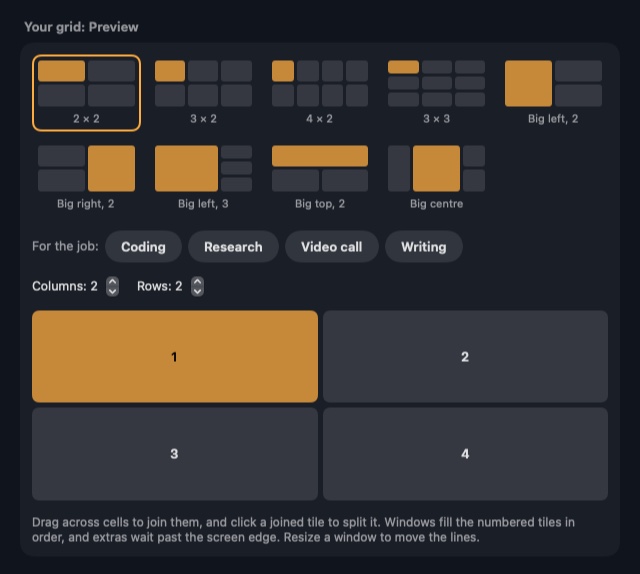
This is our app. Auto arrange tiles windows as they open, and the strip keeps them side by side. Neither needs a SIP change or a config file. It only needs the normal permissions: Accessibility to move windows, and Screen Recording for previews and for finding windows on other desktops. Findow doesn't do what the scripting addition does, so it won't replace those features. It also lacks yabai's binary space partitioning model and its command-line depth.
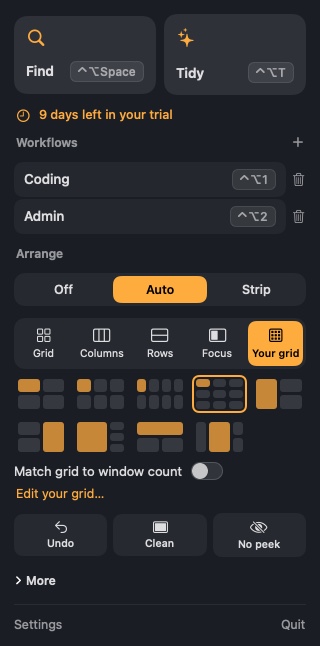
If you've got yabai running and try Findow, quit yabai first, because two tools moving the same windows will fight. For a wider view, see the best window managers for Mac, or read what a scrolling window manager is if the strip is new to you.
Questions
Does yabai require disabling SIP?
No. It's optional. yabai tiles windows with SIP on, and only the features that use its scripting addition need SIP partly disabled.
What do I lose with SIP enabled in yabai?
Moving, creating or destroying spaces, shadow removal, transparency, animations, scratchpads, sticky windows, window layers and picture-in-picture toggling.
Is it safe to disable SIP for yabai?
yabai's author makes no recommendation. SIP is a core macOS protection, so turning it off lowers your Mac's defences.
Does AeroSpace need SIP disabled?
No. Its README says it will never require you to disable SIP.
Does Findow need SIP disabled?
No. Findow's tiling and strip need no SIP changes.
Try Findow free for 14 days
Every feature, with no account and no card. Then $19.99 once, with a 14-day refund. For macOS 14 or later.
Download Findow