The best window managers for Mac in 2026
By Sheik Ahamed, who makes Findow. Checked on 31 October 2026. All guides
Short answer: start with what macOS has built in. If that isn't enough, Rectangle is the best free app. Moom and Rectangle Pro are for saved layouts. ChainYourMac is for a dedicated scrolling strip. Findow, which we make, puts switching, workflows and tiling in one app.
Start with what you already have
Recent versions of macOS can tile windows. Hold the pointer over the green button and pick a position. You can also use the shortcuts below, or Window > Move & Resize.
| Action | Shortcut |
|---|---|
| Fill the screen | Fn-Control-F |
| Left or right half | Fn-Control-Left or Right Arrow |
| Top or bottom half | Fn-Control-Up or Down Arrow |
| Back to previous size | Fn-Control-R |
Apple's built-in tiling has no thirds shortcut, no automatic tiling and no saved layouts. Those are the usual reasons to install something.
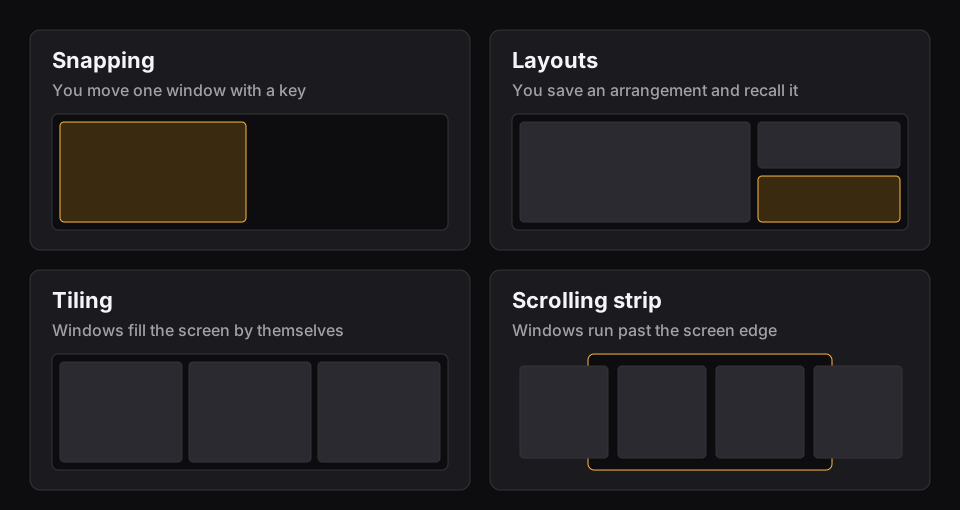
Four kinds of window manager
- Snapping: you press a key and one window moves. Rectangle and Magnet work like this.
- Layouts: you save an arrangement and bring it back. Moom and Rectangle Pro do this.
- Tiling and scrolling: windows arrange themselves. ChainYourMac gives you a scrolling strip.
- All-in-one: Findow covers switching, workflows, tiling and a strip in one app.
Compared
| App | Price | Type | Minimum macOS | Best for |
|---|---|---|---|---|
| Rectangle | Free | Snapping | 14 | Most people |
| Magnet | $4.99 | Snapping | 13 | Simple drag-to-snap |
| Moom | $15 | Layouts | 10.13 | Saved layouts and custom actions |
| Rectangle Pro | Paid, one time | Snapping and workspaces | 13.5 | Precise control |
| ChainYourMac | $19.99 once | Scrolling | 13, Apple silicon | Living on a strip |
| Findow | $19.99 once | All-in-one | 14 | Fewer apps |
Three questions that narrow it down
- Do you want to move windows, or never think about them? Moving them by hand points to snapping. Never thinking about them points to tiling or a strip.
- Do you repeat the same setup? If you open the same apps for the same kind of work each day, saved layouts or workflows save more time than faster snapping.
- What's your screen? On a 13-inch laptop, two windows may be all that fit, so a strip or fast switching helps. On a large monitor, a grid or thirds make better use of the space.
Which should you pick?
Rectangle: best free pick
It's free, open source and does the snapping most people want. Start here if you've never used a window manager.
Magnet: best for dragging
Drag a window to an edge or corner to snap it. It's sold on the Mac App Store and supports up to six external displays. Its last App Store update we saw was April 2025.
Moom: best for saved layouts
Save an arrangement and bring it back later, or chain custom actions. It costs $15 with at least a year of updates, and the licence never expires.
Rectangle Pro: best for fine control
You get 16 throw positions, custom snap areas and workspaces that can run when displays change. See how it compares with Findow.
ChainYourMac: best dedicated strip
If you want niri or PaperWM on a Mac and nothing else, this is the focused choice. See how it compares with Findow. Its site says all sales are final.
Findow: best for fewer apps
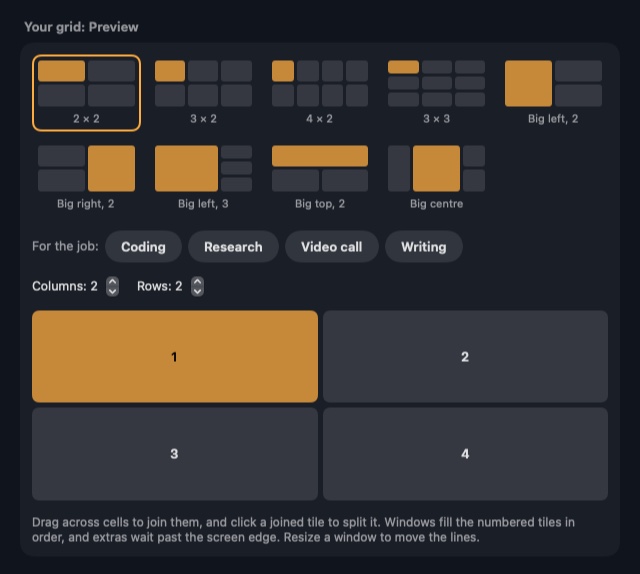
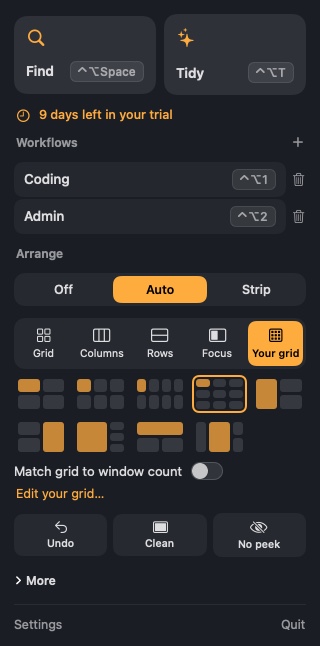
Press ⌃⌥T to tidy your desktop once, or turn on Auto arrange or the strip. It also finds any window and restores workflows. It isn't as deep as a specialist on every feature.
Other apps you may come across
A few popular tools sit outside this list because they suit a narrower group. yabai and AeroSpace are tiling window managers aimed at people who like config files. Amethyst tiles automatically with less setup. If you want a config file and full control, they're worth a look. Findow takes the opposite approach, with no config files and everything in Settings or the menu bar.
Don't stack window managers
It's tempting to keep Rectangle for shortcuts and add a tiling app on top. Snapping apps generally sit fine beside a switcher, but two apps that both move windows can fight. One moves a window, the other moves it back. Pick one to own window positions, and turn off overlapping shortcuts in the other. Apple's own drag-to-edge tiling can also clash, and you can turn it off in System Settings under Desktop & Dock.
Free or paid?
Start free. Built-in tiling and Rectangle cover most people, and you'll soon learn what's missing. Pay when you can name the job they don't do, such as restoring a layout or tiling on its own.
What about Stage Manager?
Stage Manager is Apple's own take on grouping windows. It keeps the current app in the middle, with recent groups down the side. Some people love it, though it takes up part of your screen and you can't save a named layout to bring back later. It's free, so try it before you pay for anything. For saving a setup, see how to save window layouts.
"Not listed" means the app's website doesn't mention the feature, not that the app can't do it. All names belong to their owners, and none of them is connected with Findow.
Questions
Does macOS have a built-in window manager?
It has built-in tiling. Use the green button, the Window menu, or shortcuts such as Fn-Control-Left Arrow. It doesn't have automatic tiling or saved layouts.
What is the best free window manager for Mac?
Rectangle, for most people. It's free, open source and needs macOS 14.
Do I need to turn off SIP to use Findow?
No. Findow's tiling and strip need no SIP changes and no config files.
Can I use two window managers at once?
It's best not to while something is arranging windows automatically, because they'll fight over positions. Findow warns you if another window app is running.
Try Findow free for 14 days
Every feature, with no account and no card. Then $19.99 once, with a 14-day refund. For macOS 14 or later.
Download Findow