Findow vs ChainYourMac
By Sheik Ahamed, who makes Findow. Checked on 31 October 2026. All guides
Short answer: ChainYourMac is a specialist. If a scrolling strip is what you want, and you want it deep, choose it. Findow treats the strip as one part of a bigger app, alongside a window switcher, workflows, tiling and privacy tools.
Two different kinds of app
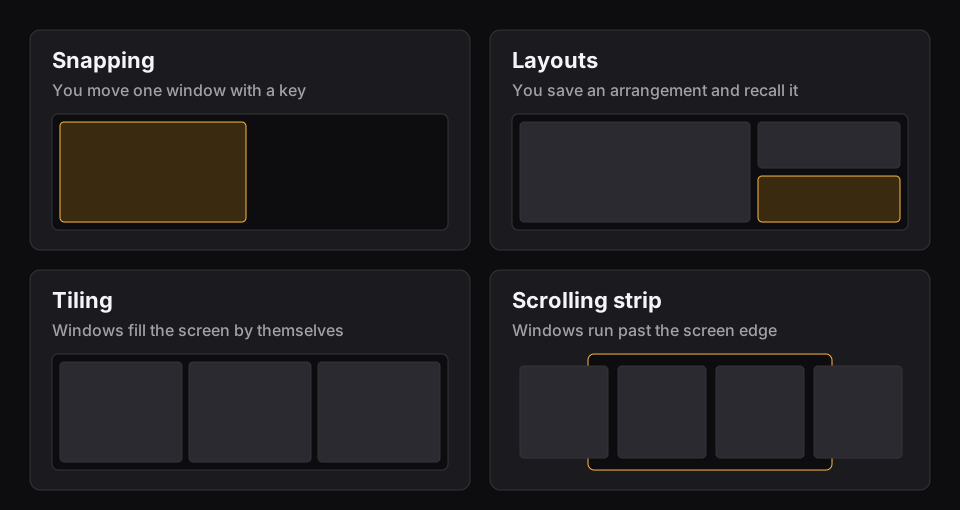
ChainYourMac does one thing: it lays your windows side by side on a horizontal strip that runs past the screen edge, in the style of niri and PaperWM. Opening a window never shrinks the others. Its site lists stacks, tabbed columns, pinned columns, per-display strips, session restore, a command line and Raycast commands.
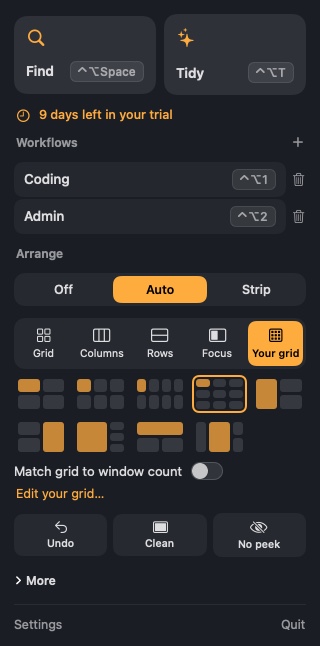
Findow starts somewhere else. Its main job is getting you to the right window and bringing a whole setup back. The strip is one of two optional arranging modes, and it's off until you turn it on.
At a glance
| Feature | ChainYourMac | Findow |
|---|---|---|
| Scrolling strip | Yes, the whole app | Yes, optional |
| Stacks, tabs and pinning on the strip | Yes | Yes |
| Search every window by typing | Not listed | Yes |
| Workflows that reopen apps and tabs | Not listed | Yes |
| Automatic grid tiling and custom grids | Not listed | Yes |
| Dim everything but your window | Off by default, dims inactive windows | Yes |
| Macs supported | macOS 13 or later, Apple silicon only | macOS 14 or later, tested on Apple silicon |
| Free trial | Not listed | 14 days |
| Refunds | All sales final | 14 days |
| Price | $19.99 once for 1 Mac | $19.99 once for 1 Mac |
| Bigger licences | 3, 5 and 20 Macs | 1 Mac |
"Not listed" means the app's website doesn't mention the feature, not that the app can't do it. All names belong to their owners, and none of them is connected with Findow.
Pick ChainYourMac if
- The strip is how you want to work all day, and you came from niri or PaperWM.
- You want a mature strip. It's at version 2 and has been tuned around this one idea, with gestures that follow your fingers.
- You're on macOS 13.
- You want a command line or a licence for several Macs.
Pick Findow if
- You spend more time finding windows than arranging them.
- You want to try it first. Findow is free for 14 days, and you can get a refund for 14 days after buying.
- You'd like to move between a strip, automatic tiling, custom grids and no arranging at all.
- You want a workflow for each kind of work, with apps and tabs that come back.
- You move between monitors and want layouts remembered for each setup.

What a scrolling strip is good at
On a normal desktop, each new window has to fight for space. A tiling app makes the others smaller, and a free-form desktop lets windows pile up. A strip avoids both. Each window keeps its width, and the strip gets longer instead. Your screen acts as a viewport that slides along it.
This works well on laptops, where screen space is tight, and on ultrawide monitors, where you can see several columns at once. It takes some getting used to, because windows you can't see are still open, just off to one side.
Both apps cover those basics, and both can stack and tab windows and pin one to the edge. ChainYourMac goes further with options such as centred-column modes, per-app rules and a guided first run. Findow keeps its strip simpler, and adds ways to leave it behind.
When the strip isn't the right tool
Some days a strip gets in the way. A video call may call for one large window, while a spreadsheet and a reference doc want a clean split. This is where an all-in-one app has an edge. In Findow you can use the strip for coding, then move to a grid or turn arranging off from the menu bar.
Findow also doesn't depend on the strip to find things. Hold ⌥Tab and type, or press ⌃⌥Space for everything, and it works in any mode. With a strip of a dozen windows, that matters more than it sounds.
Trial and refund terms
ChainYourMac's website says all sales are final, and its pages don't list a free trial. That means you need to read its requirements carefully before you buy. Findow takes the other route, with 14 days free and a 14-day refund. If you're unsure which way of working suits you, trying it costs nothing. If you're already sure you want a strip, this matters much less.
Do you need both?
Probably not. They both want to control window positions, so you'd run one strip at a time. If you buy ChainYourMac for its strip, you'd still need a separate window switcher if you want to search windows by typing.
How mature is each one?
This matters, so here it is plainly. Findow is new, at version 0.1, and it has only been built and run on Apple silicon with macOS 27. ChainYourMac has a longer history in its category. A specialist app will usually go further on its one job, and that's true here.
Questions
Is ChainYourMac free?
No. It costs $19.99 once for 1 Mac, the same as Findow. Its site says all sales are final, so check its requirements first.
Does Findow have a scrolling strip?
Yes. Windows sit on a strip wider than your screen, so opening one never shrinks the others. You can stack them, turn stacks into tabs and pin one to the edge.
Can I run both?
Findow's search and workflows can run beside other window apps. Don't run Findow's strip or Auto arrange alongside another app that moves windows, because they'd fight over positions.
Is Findow as deep as ChainYourMac on the strip?
No. If the strip is the only thing you want, a dedicated app is likely to go further.
Try Findow free for 14 days
Every feature, with no account and no card. Then $19.99 once, with a 14-day refund. For macOS 14 or later.
Download Findow