Rectangle Pro alternative: Findow vs Rectangle Pro
By Sheik Ahamed, who makes Findow. Checked on 31 October 2026. All guides
Short answer: Rectangle Pro is the better tool if placing windows exactly where you want them is the whole job. Findow is the better fit if you also want to find any window by typing, tile automatically and reopen a saved setup, all in one app.
First, do you need Pro at all?
Plain Rectangle is free, open source and needs macOS 14. If you want shortcuts for halves, thirds and corners, it may be all you need. macOS also has built-in tiling now. Paying only makes sense once you want more than snapping.
What Rectangle Pro does well
Rectangle Pro works on macOS 13.5 or later, on Intel and Apple silicon. One licence runs on 3 devices at once and it's a one-time purchase, with a 10-day free trial. Its website shows the price at checkout rather than on the page.
- Throw a window to 16 sizes and positions with one key combination, even if it isn't focused.
- Draw custom snap areas anywhere on the screen.
- Define your own window sizes, and what happens each time you repeat a shortcut.
- Arrange a full workspace of apps with one shortcut, including when displays connect or disconnect.
- Stash windows at a screen edge and pin an app to one side.
- Sync settings over iCloud and import your Rectangle shortcuts.
Findow and Rectangle Pro at a glance
| Feature | Rectangle Pro | Findow |
|---|---|---|
| Snap with shortcuts | Yes, 16 throw positions | Yes |
| Draw your own layout | Yes | Yes |
| Automatic tiling | Not listed | Yes |
| Scrolling strip | Not listed | Yes |
| Search every window by typing | Separate app (Charmstone) | Yes |
| Workflows | Arranges apps | Also reopens apps and tabs |
| Change layout when displays change | Yes | Yes |
| Dim everything but your window | Not listed | Yes |
| Minimum macOS | 13.5 | 14 |
| Macs included | 3 | 1 |
| Trial | 10 days | 14 days |
| Price | Paid, one time | $19.99 once |
"Not listed" means the app's website doesn't mention the feature, not that the app can't do it. All names belong to their owners, and none of them is connected with Findow.
Pick Rectangle Pro if
- You care most about fine control over each position and repeated shortcut.
- You want one licence for 3 Macs. Findow's covers 1 Mac at a time.
- You want iCloud sync for your settings.
- You use an Intel Mac. Rectangle Pro supports it, and Findow hasn't been run on one yet.
Pick Findow if
- You also need a window switcher, and would rather not buy a second app.
- You want windows to arrange themselves as they open, or to sit on a scrolling strip.
- Your saved setups should reopen apps and browser tabs, not only move windows that are already open.
- You want a privacy key for calls.
Snapping and arranging aren't the same job
Rectangle Pro waits for you. Press a key or drag a window, and that window goes where you told it. You stay in control, and nothing moves on its own. This suits people who have a clear idea of where each window belongs.
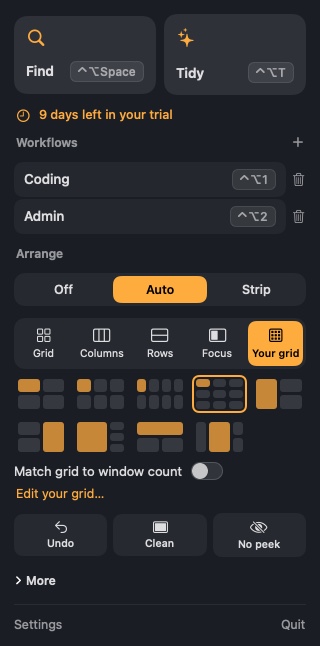
Findow can work that way too, with ⌃⌥← and ⌃⌥→ for halves, ⌃⌥↑ to maximize and ⌃⌥D, F and G for thirds. It also has three other levels:
- Tidy once: press ⌃⌥T and the windows on your desktop fall into place. Press it again to undo.
- Auto arrange: new windows take their place as they open, and the rest close the gap.
- Scrolling strip: windows sit on a strip wider than your screen, so opening one never shrinks the others.
All of these are optional and stay off until you choose them. You can change mode from the menu bar, and ⌃⌥P pauses arranging at any time.
A real example: the laptop and monitor day
Say you use a monitor at your desk and take your laptop to meetings. In Rectangle Pro, you'd build a workspace for each setup and let it run when displays connect or disconnect. That works well, and the page lists it as a built-in feature.
In Findow, "Remember layout for each monitor setup" is on by default, so your windows go back without a saved workspace. If you want more, set a workflow to switch when those monitors connect, and missing apps open too. Our guide to windows moving when you unplug a monitor explains each path.
What you give up by moving
Be clear about this before you switch. You'd lose Rectangle Pro's 16 throw positions, its snap areas that can sit anywhere on screen, and its repeat-press behaviours. You'd also lose iCloud sync and 2 of your 3 device seats. Findow gives you grids rather than free-form snap areas.
In return you'd get a window switcher, search, workflows that open apps and tabs, a strip and privacy keys, in the one app.
Using both
You can use Findow's search and workflows next to Rectangle Pro. Findow's Auto arrange and strip move windows all the time, so quit other window apps while using those modes. Findow warns you if one is running.
Questions
Is Rectangle Pro a one-time purchase?
Yes. Rectangle's documentation describes it as a one-time, lifetime purchase that can run on three devices at once.
Is Rectangle free?
Yes. Rectangle is free and open source. Rectangle Pro is the separate paid version.
Can Findow draw custom grids like Rectangle Pro's snap areas?
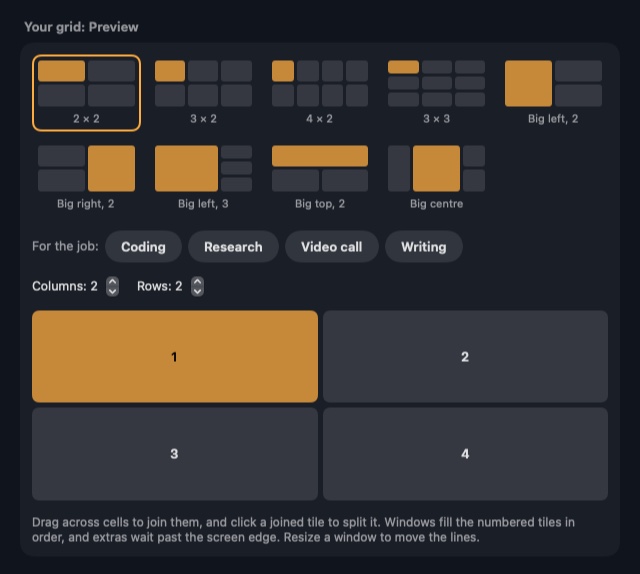
Findow lets you set rows and columns and drag across cells to join them. It's a grid builder, while Rectangle Pro's snap areas can go anywhere on the screen.
Can I import my Rectangle shortcuts into Findow?
No. Findow doesn't import them, but you can change every Findow shortcut in Settings.
Try Findow free for 14 days
Every feature, with no account and no card. Then $19.99 once, with a 14-day refund. For macOS 14 or later.
Download Findow