Findow vs Rectangle: have you outgrown free snapping?
By Sheik Ahamed, who makes Findow. Checked on 31 October 2026. All guides
Short answer: keep Rectangle if you only want to snap windows with keys or by dragging. It's free, simple and excellent. Findow is worth a look when snapping isn't the problem, and you lose time finding windows or rebuilding your setup.
Looking for an alternative to Rectangle?
Rectangle is probably the most sensible window app on the Mac, so the honest starting point is that many people should not replace it. If you press a key, a window moves, and you're happy, you're done. You may not even need that: recent versions of macOS have some tiling built in, which our window manager guide covers.
The signs you've outgrown it are specific. You snap the same windows into the same places every morning. You've got more windows than a screen holds, so snapping leaves them piled up. You keep a separate switcher beside it. Or you unplug a laptop and rebuild everything by hand. Switch if two or more of those sound familiar. Otherwise, stay.
There's also a middle step. If you like Rectangle and want more control over positions, the same developer sells Rectangle Pro. We've compared that in our Rectangle Pro guide.
How Rectangle works
Rectangle moves and resizes windows with keyboard shortcuts or by dragging to snap areas. Drag to the left or right edge for a half, the top to maximize, a corner for a quarter, or a bottom edge for a third. A footprint shows where the window will land. Pressing a shortcut again cycles through sizes.
It's based on Spectacle, and calls itself nearly a complete drop-in replacement, so former Spectacle users can pick those default shortcuts at first run. You set shortcuts in a settings window, can assign side mouse buttons, and can tell it to ignore chosen apps. Settings can be exported as JSON.
It's free under the MIT licence, and takes donations. The current app needs macOS 14 or later, and the project points to older builds for macOS 10.13 to 13. Install it from the website or with Homebrew. It doesn't do anything until you ask, and that's a large part of why it's liked.
How Findow works
Findow covers Rectangle's basic keys. ⌃⌥ with the arrow keys gives you left half, right half, maximize and center. ⌃⌥D, F and G give you thirds. Then it carries on into jobs Rectangle doesn't try to do.
⌥Tab finds any window by typing, and ⌃⌥T arranges everything on the desktop at once. Auto arrange and the Scrolling strip keep windows in order all day, if you want that. Workflows save a set of apps and positions behind ⌃⌥1 to ⌃⌥9, and Findow remembers layouts for each monitor setup.
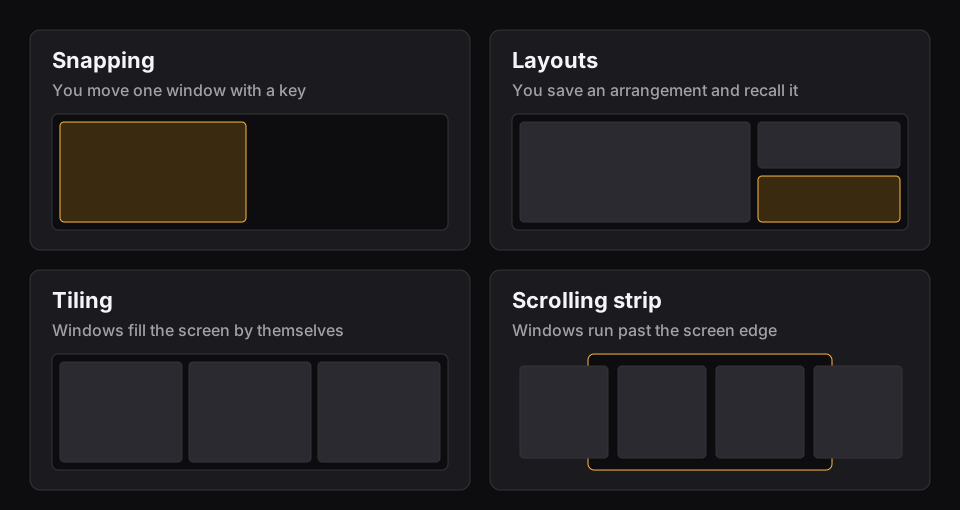
The core difference: one window, or the whole desk
Rectangle acts on the window in front of you. It doesn't try to know what else is open or what you were doing yesterday. That's a strength, because it has very little that can go wrong.
Findow thinks about the whole desk: which windows exist, where they go on this monitor setup, and which group you need for this task. The price is that it's a bigger app. It asks for more permissions, and it's newer and less proven.
In snapping itself, Rectangle is ahead. It has drag to snap, and Findow doesn't: Findow's snapping is by keys only. Rectangle also has more placement actions, such as almost-maximize and maximize height. If dragging to a screen edge is how you work, you'd miss that.
Day to day
Picture a morning with six windows. With Rectangle, you press six or so shortcuts, or drag six times. It's quick and it's the same every day. Later, you hunt for a minimized Notes window with ⌘Tab, the Dock or Mission Control.
With Findow, you press one workflow key and the set comes back. Or you press ⌃⌥T for a grid, and ⌃⌥T again if you don't like it. For the Notes window, hold ⌥Tab and type "no". The cost is a learning period, and $19.99 for something that's free in Rectangle if snapping is all you use.
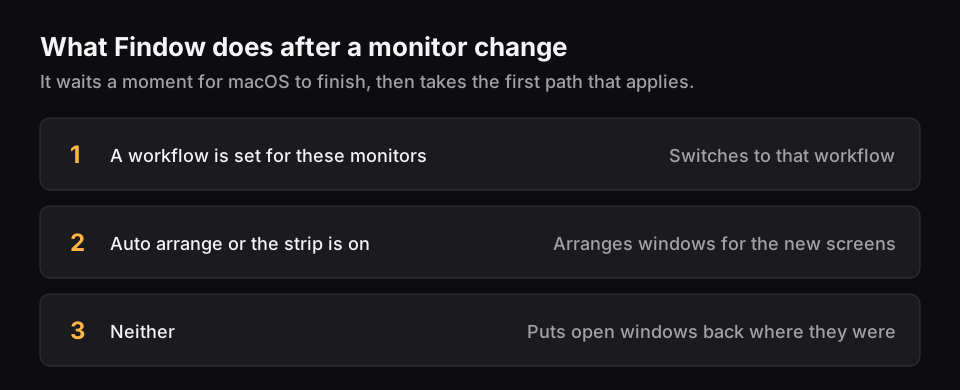
The monitor case is where the gap is widest. Rectangle moves windows across displays when you ask. Findow's job is to remember, and it puts windows back when a setup returns. If you fight this every time you unplug, that alone may justify the switch.
Findow and Rectangle compared
| Rectangle | Findow | |
|---|---|---|
| Price | Free, open source (MIT) | $19.99 once for 1 Mac, closed source |
| Layout model | You place each window yourself | Snap keys, one-press Tidy, Auto arrange or a scrolling strip |
| Drag to snap | Yes, edges and corners | No, snapping is by keys |
| Configuration | Settings window, JSON import and export | Settings and the menu bar, no config file |
| Permissions | Not listed | Accessibility, Screen Recording, Automation for browser tabs |
| Multi-monitor | Move windows across displays | Send to next display, layouts remembered per monitor setup |
| Spaces | No next or previous Space actions | Each desktop keeps its own arrangement |
| Finding windows | Not listed | ⌥Tab search and overview |
| Scripting | Not listed | findow:// links run commands |
| Learning curve | Very short | Short, with more to learn if you want it |
| Minimum macOS | 14, older builds for older systems | 14, only run on Apple silicon with macOS 27 so far |
| Support | GitHub | Email, 14-day refund |
"Not listed" means the app's website doesn't mention the feature, not that the app can't do it. All names belong to their owners, and none of them is connected with Findow.
Which should you pick?
Rectangle
For most people who only want windows to go where they point, this is the answer.
- You want free, open-source snapping.
- You drag windows to screen edges.
- You're coming from Spectacle.
- You want the smallest thing that does the job.
Findow
It earns its price only if the jobs beyond snapping are ones you do every day.
- You repeat the same arrangement often and want one key for it.
- You have too many windows to find by eye.
- You want windows to tile on their own, at least sometimes.
- You'd replace a switcher and a snapper with one app.
You don't have to choose all at once. Findow's search and workflows can run beside Rectangle. If both use the same keys, turn off Use snapping shortcuts in Findow's Settings. Findow warns you if Rectangle is running when you use its arranging modes, so quit it for those. Findow is at version 0.1 and has only been built and run on Apple silicon with macOS 27, so use the 14-day trial before you pay.
Questions
Is Rectangle free?
Yes. Rectangle is free and open source under the MIT licence. Rectangle Pro is a separate paid app.
Does Findow do what Rectangle does?
It covers halves, thirds, maximize and center by keyboard. It doesn't have drag-to-edge snapping, and Rectangle has more placement actions.
Can I run Findow and Rectangle together?
Yes, for Findow's search and workflows. Turn off Findow's snapping shortcuts if they clash, and quit Rectangle before using Auto arrange or the strip.
Is Findow worth paying for if I already have Rectangle?
Only if you also lose time finding windows or rebuilding setups. If snapping is all you want, stay with Rectangle.
Does Findow work with Spectacle shortcuts?
Findow has its own defaults, but every shortcut can be changed in Settings. It doesn't import Rectangle or Spectacle settings.
Try Findow free for 14 days
Every feature, with no account and no card. Then $19.99 once, with a 14-day refund. For macOS 14 or later.
Download Findow