Findow vs AeroSpace: emulated workspaces or your normal desktops
By Sheik Ahamed, who makes Findow. Checked on 31 October 2026. All guides
Short answer: pick AeroSpace if you want i3-style tiling, fast keyboard workspaces and a config in your dotfiles. It's free. Pick Findow if you'd rather keep macOS desktops, avoid config files and get window search and saved workflows in the same app.
Looking for an alternative to AeroSpace?
AeroSpace is very good, so start with why you're looking. Some people want a settings window, and AeroSpace's author has said there won't be one. Others dislike the side effects of its workspaces, or want borders and animations, which the project treats as out of scope. Some just hit a bug and wonder what else exists.
Switch if the text config is what's stopping you from using a tiling manager at all, or if you want to keep using Mission Control and Spaces as Apple designed them. Stay if instant workspace switching is the reason you installed it. Findow has nothing that matches that, because it doesn't replace desktops. If you want more options than Findow, we've written up AeroSpace alternatives across the board.
How AeroSpace works
AeroSpace is an i3-like tiling manager. Windows live in a tree. Each workspace has a root, containers hold windows, and each container is laid out as tiles or as an accordion, where windows stack with a little padding showing those beneath. You can nest containers as deep as you like.
Its most distinctive choice is its workspaces. The project calls native Spaces slow to switch and hard to control, so it doesn't use them. Instead it moves windows from inactive workspaces to a corner of the screen, off to the bottom left or right. Switching is quick, with no animation. On quit or crash, it brings all windows back on screen.
This has knock-on effects, and the guide is open about them. A sliver of each hidden window can stay visible at the screen edge. Each monitor needs a free bottom corner. Mission Control can show windows too small. The guide also recommends turning off Displays have separate Spaces, which means a window can't span monitors in the usual way and macOS fullscreen behaves less cleanly.
Setup is a TOML file at ~/.aerospace.toml. It covers key bindings, binding modes like i3's, and callbacks that run when a new window appears. There's a CLI with man pages and shell completion. AeroSpace needs no SIP changes, and the binary needs macOS 13. Homebrew is the preferred install. The app isn't notarized, so the install script removes the quarantine flag. It's in public beta: the author calls it fit for daily use, but expects breaking changes before 1.0.
How Findow works
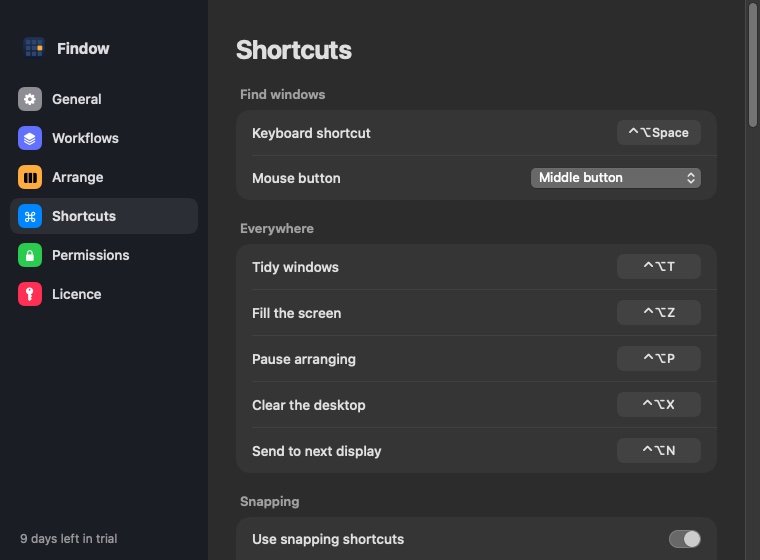
Findow doesn't touch the idea of a desktop. Your Spaces stay as they are, and each one keeps its own arrangement. You can ignore tiling completely and use Findow as a switcher, tap ⌃⌥T to tidy once, or turn on Auto arrange or the Scrolling strip from the menu bar.
Where AeroSpace has workspaces, Findow has workflows. They're not the same thing. A workflow is a saved set of apps and window positions behind a key. It can hide everything else or tidy on arrival, and it's built to reopen tabs in Chrome, Arc, Brave and Edge. Switching can open apps that aren't running, so it takes longer than AeroSpace's near-instant flip, but it can rebuild a setup from nothing.
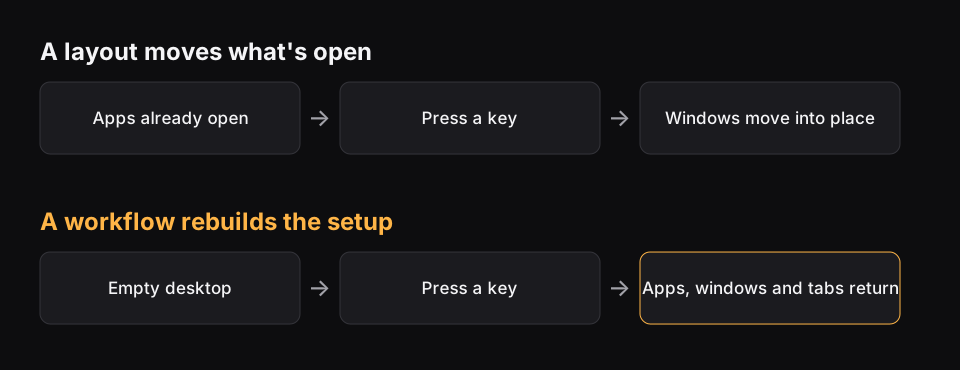
The core difference: who owns the desktop
AeroSpace takes over. It decides what a workspace is, and in return you get speed and predictability from the keyboard. Findow fits in around macOS, and in return you keep Mission Control and native desktops, along with their slower animations.
The second split is text against interface. An AeroSpace config can go in git and follow you to any Mac. Findow's closest thing is exporting workflows to a file. If you want to read your whole setup in one file, Findow won't give you that.
Findow is not an i3 port either, and neither of these apps is i3. Findow has no tree, no containers to nest and no binding modes. If you came from i3 or sway on Linux, AeroSpace will feel like home and Findow won't. Its Auto arrange uses Grid, Columns, Rows, Focus or a grid you draw.
Day to day
With AeroSpace, most users keep windows full and flip between numbered or lettered workspaces with one chord. Apps can be sent to a workspace as they open. It's hard to beat for speed if you've learned your keys. The AeroSpace goodies page lists add-ons for the extras, such as JankyBorders for focus borders and Sketchybar for workspace indicators.
With Findow, you usually stay in one or two desktops and move by search. Hold ⌥Tab, type two letters, let go. The overview shows minimized windows and other desktops too. When a task changes, press its workflow key. Borders are built in, under Settings > Arrange. So are gaps, kept-free screen edges and focus follows mouse, which is off by default.
Findow and AeroSpace compared
| AeroSpace | Findow | |
|---|---|---|
| Price | Free, open source (MIT), optional sponsorship | $19.99 once for 1 Mac, closed source |
| Layout model | i3-style tree of tiles and accordions | Grid, Columns, Rows, Focus, your own grid, or a scrolling strip |
| Configuration | TOML file, no settings window planned | Settings and the menu bar, no config file |
| SIP | No changes | No changes |
| Permissions | Accessibility | Accessibility, Screen Recording, Automation for browser tabs |
| Multi-monitor | One shared pool of workspaces, pin them to monitors | Each display keeps its own layout, remembered per monitor setup |
| Spaces | Ignores native Spaces and emulates its own | Uses native desktops, each with its own arrangement |
| Scripting | CLI first, with man pages and callbacks | findow:// links run commands |
| Learning curve | Moderate, easier if you know i3 | Short, it works once you pick a mode |
| Status | Public beta, breaking changes expected before 1.0 | Version 0.1, only run on Apple silicon with macOS 27 so far |
| Install | Homebrew preferred, not notarized | Download from findowmac.com |
| Support | GitHub Discussions | Email, 14-day refund |
"Not listed" means the app's website doesn't mention the feature, not that the app can't do it. All names belong to their owners, and none of them is connected with Findow.
Which should you pick?
AeroSpace
If you think in workspaces and keys, it's a strong free choice.
- You want i3-style trees and binding modes.
- You want a config in your dotfiles, the same on every Mac.
- Fast workspace switching matters more to you than Mission Control.
- You want to spend nothing.
Findow
If you want your Mac to keep working like a Mac, with help on top, Findow is the better fit.
- You want to keep native desktops and Mission Control.
- You'd rather use Settings than edit TOML.
- You want a window switcher with search in the same app.
- You want setups that reopen apps, not only rearrange them.
Findow warns you if AeroSpace is running when you use its arranging modes, because both would move the same windows. To try Findow, quit AeroSpace first. Your config file stays where it is, so going back is easy. Findow is at version 0.1 and has only been built and run on Apple silicon with macOS 27, so use the 14-day trial on your real work.
Questions
Is AeroSpace free?
Yes. It's open source under the MIT licence, and the author accepts optional sponsorship.
Does AeroSpace use native macOS Spaces?
No. It emulates its own workspaces by moving inactive windows to a corner of the screen. Findow uses your normal desktops.
Does Findow have workspaces like AeroSpace?
Not in the same way. Findow has workflows, which save apps and window positions and can hide everything else. They don't replace macOS desktops, and they're slower than AeroSpace's workspace flip.
Is Findow an i3 port?
No. Findow has no tree, nested containers or binding modes. AeroSpace is much closer to i3 if that's what you're after.
Does either app need SIP disabled?
No. AeroSpace says you don't need to disable SIP, and Findow needs no SIP changes either.
Try Findow free for 14 days
Every feature, with no account and no card. Then $19.99 once, with a 14-day refund. For macOS 14 or later.
Download Findow