Hyprland for Mac: what you can and can't get
By Sheik Ahamed, who makes Findow. Checked on 31 October 2026. All guides
Short answer: Hyprland can't run on macOS, because it's a Wayland compositor. You can get dwindle-style tiling from OmniWM or yabai, and borders from JankyBorders. Hyprland's full visual layer isn't available on a Mac, because only Apple's window server draws windows there.
Split Hyprland into two parts
When people say they want Hyprland on a Mac, they usually mean one of two things. It helps to treat them separately, because the answers are very different.
The first is the tiling: dynamic layouts, keyboard control and a config that reloads as you save. Mac apps can do this well. The second is the look: animated windows, effects on every surface, and a desktop you've made your own. Most of that isn't open to a Mac app.
Why the look doesn't carry over
Hyprland is the compositor, so it draws every window and can do whatever it likes with those pixels. It's also built for Linux, and its own wiki expects you to understand how Linux works. A normal Mac window manager has none of that access. It's an ordinary app that asks other apps' windows to move and resize. It can't apply a shader to another app's window or take over the system's own animations. yabai gets further with its optional scripting addition, which loads into the Dock and needs SIP partly disabled, but it still isn't drawing your windows.
Plugins are the other gap. Hyprland lets you write plugins in C++ that extend the compositor itself. No Mac tool can offer the same thing, for the same reason. Expect window-level control and not much below that.
Getting the tiling
| Tool | Price | Layouts | Setup | Worth knowing |
|---|---|---|---|---|
| OmniWM | Free, GPL-2.0 | Dwindle and niri-style scrolling, per workspace | settings.toml, reloads on save | macOS 26 or later, Apple silicon |
| yabai | Free, MIT | Binary space partitioning | CLI, usually with skhd | Some features need SIP partly disabled |
| AeroSpace | Free, MIT | i3-style tree | TOML file | Public beta. No SIP changes |
| Rift | Free, Apache 2.0 | Tiling, BSP, master-stack, scrolling | Hot-reloading TOML | Uses private macOS APIs |
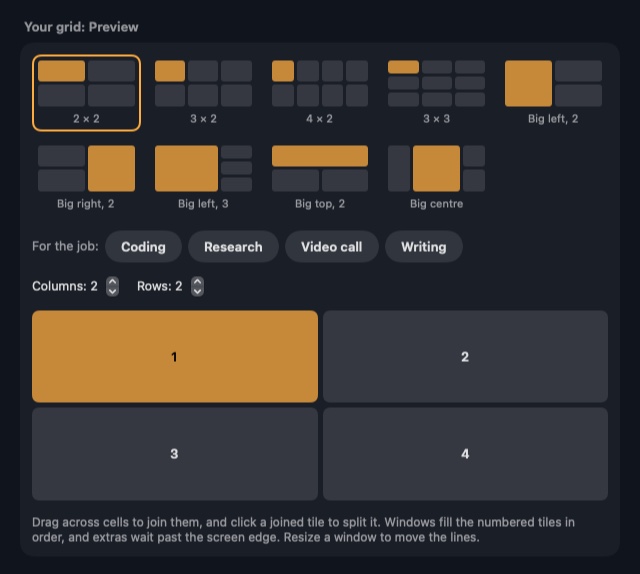
| Findow | $19.99 once, 1 Mac | Grid, Columns, Rows, Focus, your own grid, strip | Settings window | No config file |
"Not listed" means the app's website doesn't mention the feature, not that the app can't do it. All names belong to their owners, and none of them is connected with Findow.
OmniWM is the place to start. It names Hyprland as an inspiration, offers a Dwindle layout that splits space recursively, and has a workspace bar you can customize. Official releases don't need SIP disabled. Its one catch is the requirement for macOS 26 on Apple silicon.
If you liked the i3-style side of your Hyprland config, our i3 for Mac guide covers AeroSpace in detail. If you came to Hyprland for scrolling layouts through a plugin, see the niri guide instead.
Getting closer on the look
A popular way to dress up a Mac tiling setup is to add small tools:
- JankyBorders draws coloured borders around windows to highlight the focused one. It needs macOS 14 or later, and it installs with Homebrew. You can start it from yabai or AeroSpace.
- SketchyBar is a customizable status bar replacement, close to what you'd use Waybar for. It has its own animation system, but that applies to the bar and not to your windows.
- yabai supports window animations, and lists Screen Recording as a permission they need. JankyBorders can follow them. We can't tell you how close that gets to Hyprland, so try it before you plan around it.
Blurred window backgrounds, dimming rules and shaders across every app are the things we didn't find on the Mac side. Some apps have their own blur, and that's set in the app, not by your window manager.
How your Hyprland habits map onto Findow
Findow isn't a port of Hyprland, and it's not trying to be a ricing tool. There are a few honest matches.
| In Hyprland | In Findow |
|---|---|
| Dynamic tiling | Auto arrange. New windows take their place, and the rest close the gap |
| Master layout | Main window takes half, 60% or two thirds of the screen |
| Dwindle layout | No match. Findow uses set layouts and grids, not recursive splits |
| Gaps | Gap between windows, down to none, and Keep free for each screen edge |
| Active border colour | Highlight in Settings > Arrange: None, Border or Glow, with your own Colour |
| Window groups | Stacks with tabs |
| Toggle floating | Float or unfloat window, ⌃⌥⇧F |
| Dim inactive | No peek, ⌃⌥⇧N. Darkens or blurs everything but the active window |
| Special workspaces | No match |
| hyprctl and IPC | No match. Links such as findow://run/tidy can trigger actions only |
| Plugins and config file | No match |
No peek is the one surprise here. It's aimed at privacy on calls, but it gives you a focus effect you may miss from Hyprland. You can make it darker or add a blur, and one more press removes it. Clean Space (⌃⌥⇧Z) goes further and fills the screen with your window while two panels close in behind it.
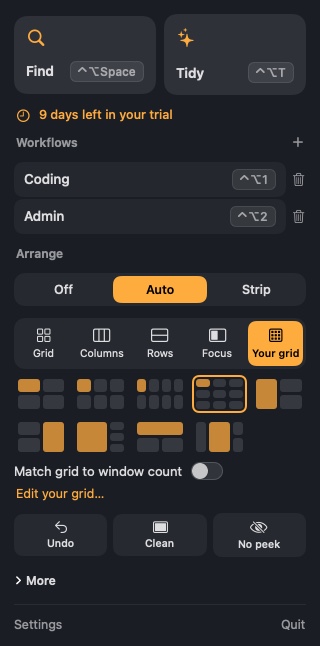
Windows glide into place on the strip, unless you've turned on Reduce Motion. That's a small animation, and you can't edit its curves. Findow has no theming beyond the highlight colour.
Which should you pick?
If tinkering was half the fun of Hyprland, go with OmniWM, or yabai with JankyBorders and SketchyBar. They're free and they reward time spent on them, and Findow won't scratch that itch. If you mainly want tidy windows and a focused window that stands out, and you'd rather not maintain anything, Findow may suit you. It also finds any window by name and brings back whole workflows.
Findow is $19.99 once for one Mac, with a 14-day free trial and a 14-day refund. It needs macOS 14 or later, and so far it's only been built and run on Apple silicon with macOS 27.
Questions
Can I run Hyprland on macOS?
No. Hyprland is a Wayland compositor built for Linux, and macOS doesn't use Wayland. Separate Mac apps can copy its tiling, but not the compositor itself.
What is the closest thing to Hyprland on a Mac?
OmniWM, which names Hyprland as an inspiration and offers a Dwindle layout. It needs macOS 26 on Apple silicon.
Can I get window blur on a Mac like Hyprland?
Not across every app. A Mac window manager can't change how other apps' windows are drawn. Findow's No peek can blur everything except the active window, but that's a full-screen effect.
Can I add borders to the active window on a Mac?
Yes. JankyBorders is free and works with yabai and AeroSpace. Findow also has a Border or Glow highlight in Settings > Arrange.
Does Findow have a config file?
No. You set everything in Settings or the menu bar, so there's nothing to keep in your dotfiles.
Try Findow free for 14 days
Every feature, with no account and no card. Then $19.99 once, with a 14-day refund. For macOS 14 or later.
Download Findow