The best scrolling window managers for Mac
By Sheik Ahamed, who makes Findow. Checked on 31 October 2026. All guides
Short answer: for a free option you can script, try PaperWM.spoon or Paneru. For a paid app with no config, ChainYourMac is a dedicated strip. Findow, which we make, adds a strip to a window switcher and workflows. niri and PaperWM themselves don't run on a Mac.
What counts as scrolling
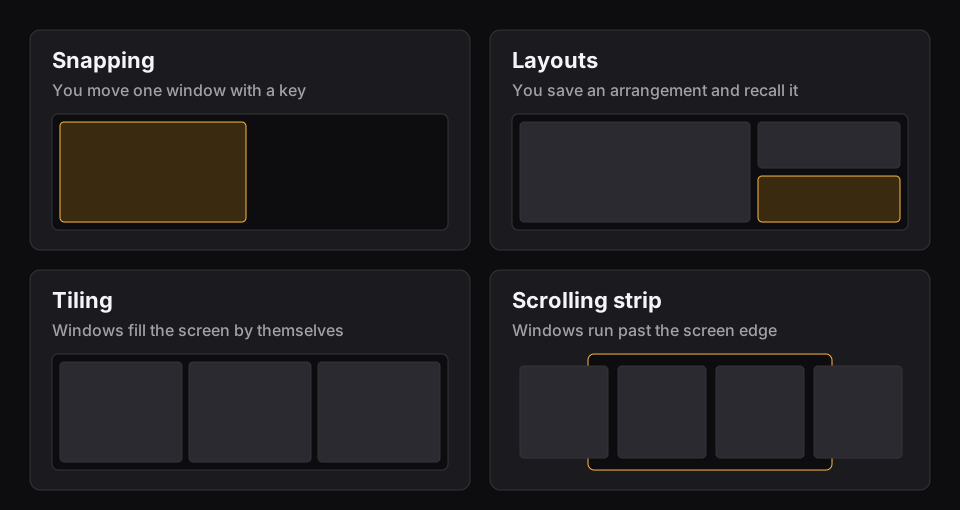
A scrolling manager keeps windows on a strip wider than your screen, so opening one leaves the others alone. If that's new to you, start with what a scrolling window manager is. We've only included tools that do this on a Mac. That rules out AeroSpace, which is a good app but uses tree-based tiling in the style of i3, and yabai, which is built on binary space partitioning. Both divide the screen.
Compared
| App | Price | Set up with | SIP changes | Needs |
|---|---|---|---|---|
| PaperWM.spoon | Free on GitHub | Lua file | Not listed | Hammerspoon |
| Paneru | Free, MIT licence | TOML or Lua file | Not listed | Accessibility access |
| ChainYourMac | $19.99 once, 1 Mac | Settings window | None | macOS 13, Apple silicon |
| Findow | $19.99 once, 1 Mac | Settings window | None | macOS 14 |
"Not listed" means the app's website doesn't mention the feature, not that the app can't do it. All names belong to their owners, and none of them is connected with Findow.
PaperWM.spoon: best free pick for tinkerers
This is a plug-in for Hammerspoon, the free Mac automation tool. You add a few lines to a Lua file and get a strip with stacked columns, width cycling, per-app widths and swipe gestures. You can bind every action to any keys, and even build a modal key set in the style of vim.
Pick it if you already use Hammerspoon or you enjoy tuning your setup. Skip it if you'd rather never open a config file. It also has some rough edges of its own: its notes say dragging windows between spaces isn't reliably detected, and some apps need opting in. Our PaperWM.spoon setup guide walks through it.
Paneru: best free app inspired by niri
Paneru is an MIT-licensed window manager for macOS. It keeps an infinite strip for each monitor, and its README names niri and PaperWM.spoon as inspiration. You install it with Homebrew or Cargo, and write a TOML file, or Lua if you'd like more control. Config changes reload by themselves, and there's a command-line tool for scripting it.
Pick it if you came from niri and want a file you can keep in your dotfiles. It has clear habits you'll have to accept, such as a thin sliver of each off-screen window at the edge. Its README also says "Displays have separate spaces" should be on, and suggests placing extra displays above or below the main one. It's a good sign that the README is this frank, but expect to do some of your own troubleshooting.
ChainYourMac: best dedicated paid strip
ChainYourMac does one job: a scrolling strip you set up in a settings window. Its own listing covers stacks, tabbed columns, preset widths, pinning, a strip per display, session restore, trackpad swipes that follow your fingers, gaps, a focus border and dimming of inactive windows. It asks for no SIP changes.
Pick it if a strip is the one thing you want and you don't need a window finder or workspaces. It costs $19.99 for one Mac, with larger licences for 3, 5 and 20 Macs, so it's a better fit if you own several. It's for Apple silicon Macs on macOS 13 or later. All sales are final, and its listing doesn't mention a free trial. See Findow vs ChainYourMac for more detail.
Findow: best if you also want switching and workflows
Findow's Scrolling strip is one of three arrange modes. You get stacks, tabbed columns, pins, width cycling, fixed positions for apps and a map of the strip when you hold ⌃⌥. Each desktop keeps its own strip, and it remembers order, widths and stacks across restarts.
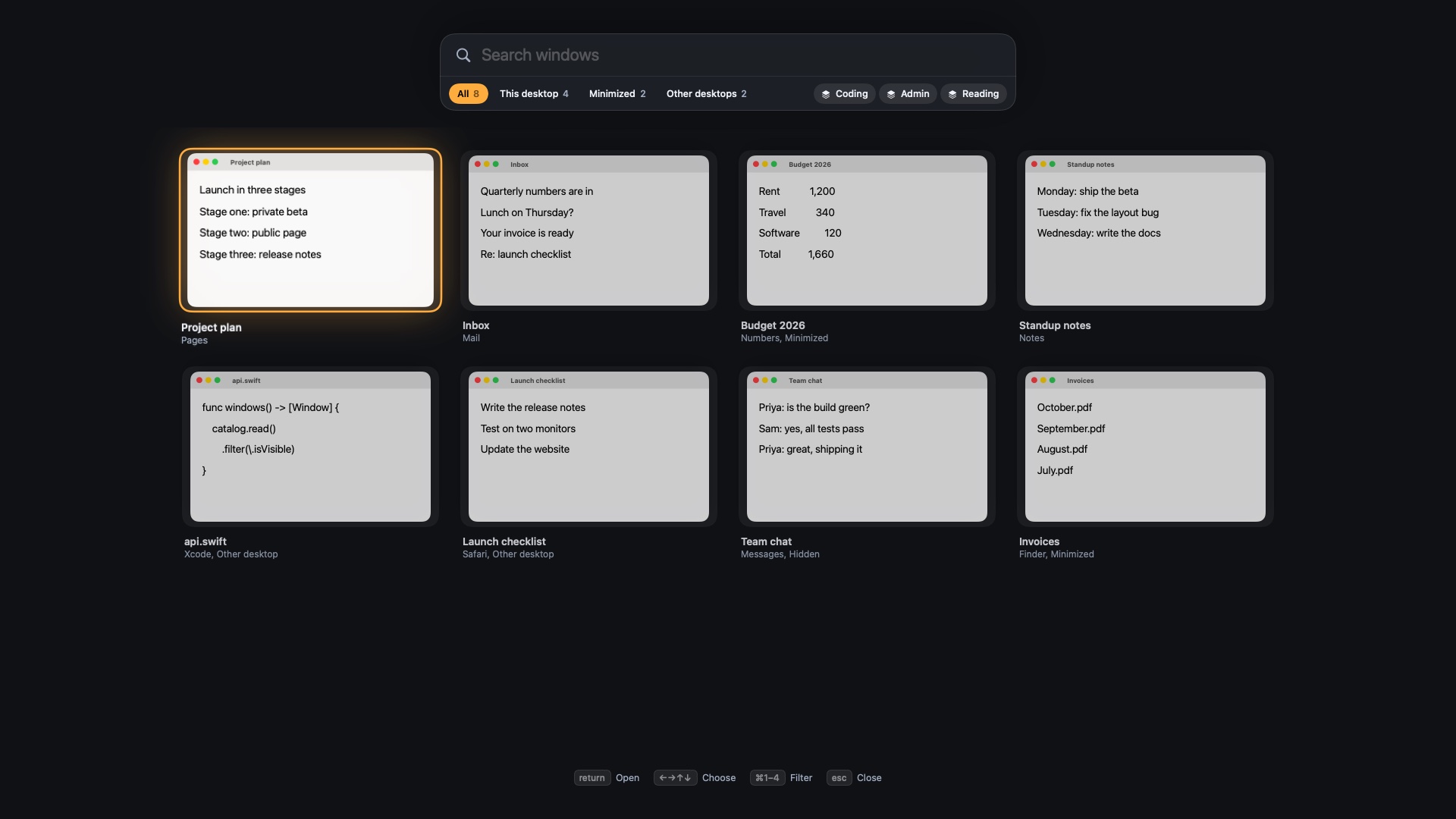
The reason to pick it is what surrounds the strip. ⌥Tab finds any window by typing, including minimized ones and ones on other desktops. ⌃⌥1 to ⌃⌥9 bring back saved workflows. You can also turn the strip off and use Auto arrange or plain snapping.
The trade-off is breadth. Findow isn't a port of niri and has no config file, though you can drive it with findow:// links from a script. The strip's width steps are fixed, and a dedicated tool may go deeper. It's version 0.1 and has only been built and run on Apple silicon with macOS 27 so far. It costs $19.99 once for one Mac, with a 14-day free trial and a 14-day refund.
What you can't use on a Mac
You'll see these names in every discussion of scrolling, so here's where they run:
- niri: a Wayland compositor for Linux. See how to get the same setup on macOS.
- PaperWM: a GNOME Shell extension for Linux. PaperWM.spoon is a separate project for Mac.
- Karousel: a KWin script for KDE Plasma on Linux.
- scroll: a Wayland compositor forked from sway, for Linux.
None of these has a Mac version that we could find on its project page.
How to choose
- Do you want a config file? Yes: Paneru or PaperWM.spoon. No: ChainYourMac or Findow.
- Do you want to pay nothing? Paneru or PaperWM.spoon.
- Do you use several monitors side by side? Read each tool's notes first. Both free tools suggest stacking displays vertically.
- Do you also pay for a switcher or a workspace app? Findow may replace them.
- Do you just want a strip on more than one Mac? ChainYourMac's larger licences will suit you better.
Whichever you try, run only one at a time. Two tools moving the same windows will fight. If you've got Rectangle or a similar app running, quit it first. Our wider guide to the best window managers for Mac covers snapping and layout apps too.
Questions
What is the best free scrolling window manager for Mac?
PaperWM.spoon if you use Hammerspoon, or Paneru if you want a standalone tool with a TOML file. Both are on GitHub at no cost.
Is niri available for Mac?
No. niri is a Linux Wayland compositor. Paneru is a Mac project inspired by it.
Do scrolling window managers on Mac need SIP disabled?
ChainYourMac and Findow say no. The pages for PaperWM.spoon and Paneru don't mention SIP.
Does AeroSpace have a scrolling layout?
Its GitHub page describes tree-based tiling in the style of i3 and doesn't mention a scrolling layout.
Can I try a scrolling window manager for free?
Yes. PaperWM.spoon and Paneru are free, and Findow has a 14-day free trial.
Try Findow free for 14 days
Every feature, with no account and no card. Then $19.99 once, with a 14-day refund. For macOS 14 or later.
Download Findow