AeroSpace alternatives for Mac, sorted by why you're leaving
By Sheik Ahamed, who makes Findow. Checked on 31 October 2026. All guides
Short answer: the best AeroSpace alternative depends on why you're leaving. For a free, feature-rich app, try OmniWM. For deep scripting, use yabai. For simple tiling, use Amethyst. If you want no config file, plus search and workflows, try Findow, which is our app.
Check why you're leaving first
AeroSpace is free and well liked, so it's worth naming the actual problem. A quick reminder of what it is: an i3-like tiling manager that keeps windows in a tree, set up with a TOML file. It emulates its own workspaces by parking inactive windows in a screen corner. It needs no SIP changes, the binary needs macOS 13, and it's in public beta with breaking changes expected before 1.0.
That design leads to a handful of common complaints, and each one points to a different app. If you only want a general overview, see the best window managers for Mac. The rest of this guide goes reason by reason.
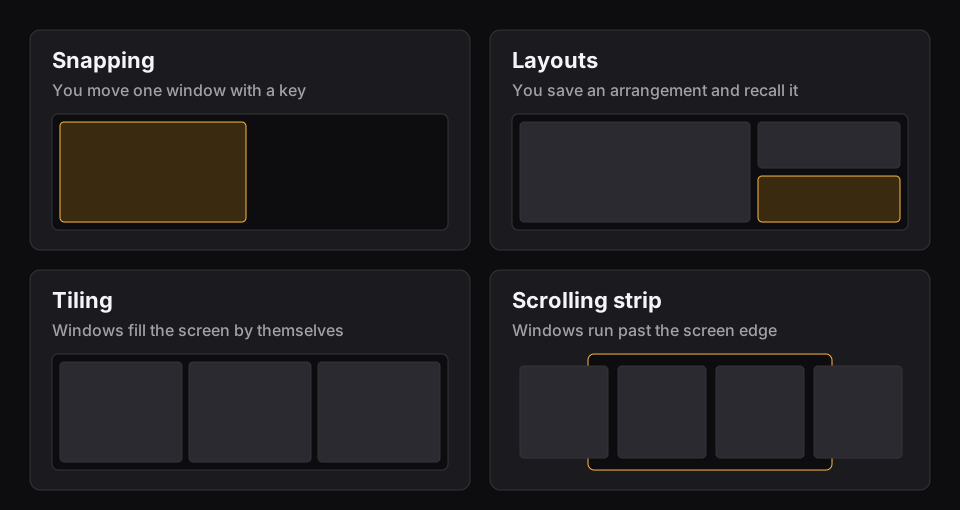
The alternatives at a glance
| App | Price | Model | Configured by | Needs | Best for |
|---|---|---|---|---|---|
| yabai | Free, MIT | BSP, stack, float | Config file and CLI | macOS 11 or 12, SIP changes for some features | Scripting native Spaces |
| OmniWM | Free, GPL-2.0 | Scrolling and dwindle | Settings and TOML | macOS 26, Apple silicon | A modern, full-featured free app |
| Amethyst | Free, MIT | Named layouts | Settings or YAML | macOS 10.15 | Simple automatic tiling |
| Rift | Open source | Tiling, BSP, stack, scrolling | TOML | Not listed | Animations and per-display fullscreen |
| FlashSpace | Open source, GPL-3.0 | Workspaces only, no tiling | Settings | macOS 14 | Keeping fast workspaces |
| Rectangle | Free, MIT | Manual snapping | Settings | macOS 14 | Dropping tiling altogether |
| Findow | $19.99 once | Grids and a strip | Settings | macOS 14, tested on Apple silicon | No config file, plus search and workflows |
"Not listed" means the app's website doesn't mention the feature, not that the app can't do it. All names belong to their owners, and none of them is connected with Findow.
"I want real macOS Spaces"
yabai is the obvious move. It works with native Spaces and can create, move and destroy them, though those actions need SIP partly disabled. It tiles with binary space partitioning, with stack and float layouts, and it's scriptable through a CLI, JSON queries, rules and signals. Hotkeys come from a separate tool such as skhd. It's the most powerful option here and the most work. Our Findow vs yabai guide goes deeper on that trade.
Amethyst also leaves Spaces in place, without the SIP question. It's free, runs from macOS 10.15, and tiles automatically with over a dozen named layouts such as Tall, Wide and BSP. Its keys follow xmonad. It has a settings window as well as a YAML file, which makes it the gentlest step away from a tree.
"I want a settings window"
AeroSpace's author has said there won't be a GUI for configuration, so this one needs a different app.
OmniWM has a settings window as well as a live TOML file, so you get both. It's free under GPL-2.0-only, and it offers niri-style scrolling and Hyprland-style dwindle per workspace. It also has an overview, a command palette, scratchpads and a Quake terminal. The catch is that it needs macOS 26 or later and Apple silicon, along with Displays have separate Spaces turned on.
Findow has no config file at all. Settings and the menu bar cover everything. It has Auto arrange with Grid, Columns, Rows, Focus or a grid you draw, plus a Scrolling strip. It uses your normal desktops, and each one keeps its own arrangement. It costs $19.99 once for 1 Mac, with a 14-day free trial. It's at version 0.1, and has only been built and run on Apple silicon with macOS 27.
"I want animations and better fullscreen"
AeroSpace treats borders, transparency and animations as out of scope. Rift was written partly in response. Its author says AeroSpace worked well but lacked animations and the ability to use fullscreen on one display while working on another. It's a fork of glide-wm that needs no SIP changes, and it reloads its config live. It offers i3-style tiling, BSP, floating, master-stack, stacks and niri-style scrolling columns, with a default TOML config in the repository. The README doesn't state a minimum macOS or a chip requirement, so check before you commit.
"I only came for the workspaces"
Plenty of people use AeroSpace with every window full-screen and rely on the workspace keys. If that's you, you may not need a tiling manager. FlashSpace is a virtual workspace manager that doesn't tile. You assign apps and a display to a workspace, and switching shows those apps and hides the others, using native show and hide. It's GPL-3.0, needs macOS 14 and Displays have separate Spaces, and has profiles and a CLI.
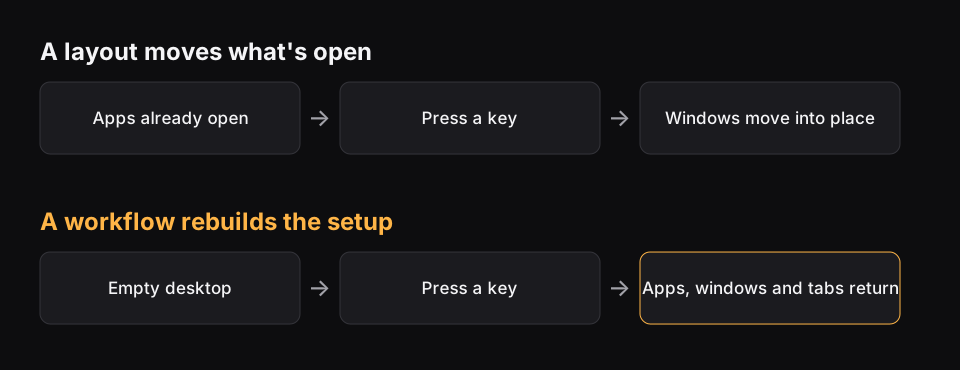
Findow's workflows look similar but aren't the same. They save apps and positions, can hide everything else, and can open what's missing. They're slower than a workspace flip, but they can rebuild a setup from nothing. Findow is built to reopen tabs in Chrome, Arc, Brave and Edge. See how saved layouts and workflows differ.
"I'm done with tiling"
This is a fair conclusion. If tiling has become a hobby rather than a help, Rectangle is free, MIT licensed and only moves a window when you ask, by key or by dragging to a screen edge. It needs macOS 14. Our Rectangle comparison shows where it stops. Loop, also free, does the same with a radial menu around your cursor.
A note on i3 and other Linux tools
If you came to AeroSpace from i3 or sway, none of these is a port. Rift has the closest i3-style layout on this list. Findow in particular has no tree, containers or binding modes, so your i3 habits and config won't carry over.
How to choose
- Want to stay free? Rule out Findow and start with OmniWM, yabai, Amethyst or Rift.
- On a macOS older than 26? Rule out OmniWM.
- Can't change SIP on a work Mac? yabai still runs, but without its Space controls.
- Want to use the same keys and tree? Stay with AeroSpace. Nothing here matches it exactly.
- Want a single app with search too? Try Findow for 14 days, and see how it compares directly.
Quit AeroSpace before testing any of these, because two window managers will fight over the same windows. Findow warns you if AeroSpace is running when you use its arranging modes, but most other tools won't. Your AeroSpace config stays in place, so you can always go back.
Questions
What's the best free AeroSpace alternative?
OmniWM if you're on macOS 26 or later with Apple silicon. Amethyst for simple tiling on older systems, and yabai if you want scripting.
Is there an AeroSpace alternative with a settings window?
Yes. OmniWM and Amethyst both have one alongside a config file. Findow has only Settings and the menu bar, with no config file.
Which AeroSpace alternative doesn't need SIP changes?
Amethyst's README doesn't mention SIP. OmniWM, Rift and Findow say they need no SIP changes. yabai runs with SIP on, but some features need it partly disabled.
Is Findow a replacement for AeroSpace?
Only for some people. It has no tree or virtual workspaces. It suits you if you want tiling without a config file, plus search and workflows.
Try Findow free for 14 days
Every feature, with no account and no card. Then $19.99 once, with a 14-day refund. For macOS 14 or later.
Download Findow