i3 for Mac: the closest options on macOS
By Sheik Ahamed, who makes Findow. Checked on 31 October 2026. All guides
Short answer: i3 runs on X11, so you can't use it as your Mac's window manager. AeroSpace is the closest match, and for most i3 users it's the one to install. It's free, it uses a tree of containers, a text config and binding modes, and it needs no SIP changes.
Why i3 users should start with AeroSpace
We sell a window app, and we'd still point you here first. Findow isn't a keyboard-first tiling system and it isn't an i3 port. If your i3 config is the thing you love, you want a tool built around the same ideas.
AeroSpace describes itself as an i3-like tiling window manager for macOS. It's open source under the MIT licence and it's CLI first, with manpages and shell completion. Your settings live in a TOML file that you can keep in your dotfiles. The binary runs on macOS 13 or later. Its README calls it a public beta that's fine as a daily driver, but warns you to expect breaking changes until version 1.0. It also isn't notarized by Apple, and the project recommends installing with Homebrew.
How i3's ideas map onto AeroSpace
| In i3 | In AeroSpace | How close |
|---|---|---|
| Tree of containers | Tree of nodes, with normalization on by default | Close |
| splith and splitv | h_tiles and v_tiles | Close |
| Tabbed and stacking | h_accordion and v_accordion | Same job, different look |
| Binding modes | Binding modes, starting in main | Close |
| ~/.config/i3/config | ~/.aerospace.toml or an XDG path | New syntax, so rewrite it |
| i3-msg | aerospace CLI | Close |
| Workspaces | Its own emulated workspaces | Works differently |
"Not listed" means the app's website doesn't mention the feature, not that the app can't do it. All names belong to their owners, and none of them is connected with Findow.
Your config won't transfer. The ideas do, but the format is TOML and every binding has to be listed explicitly, so plan on an evening of rewriting.
The big difference: workspaces
This is the part that surprises i3 users most. On X11, i3 has full control. On a Mac, Apple's desktops, called Spaces, can't be driven freely through a public API. AeroSpace's guide says they're slow to switch and limited in number.
So AeroSpace skips them. It uses its own workspaces and moves windows that aren't on the active workspace into a corner of the screen, just out of view. You work on one macOS desktop and leave Spaces alone. When AeroSpace quits, or detects a crash, it brings all windows back. You may see a one-pixel sliver of a hidden window at the screen edge. It's a clever workaround, and it means you do get fast keyboard workspaces.
Other options if you came from i3
yabai
yabai is free under the MIT licence and uses binary space partitioning, which suits you if you liked bspwm as well. You control it through a CLI and pair it with skhd for keyboard shortcuts. Some features need you to partly disable System Integrity Protection, so that it can load a scripting addition into the Dock. The project doesn't push you either way. That's a real decision, so read its docs first.
Amethyst
Amethyst is free under the MIT licence, and it's inspired by xmonad rather than i3. Its layouts are automatic, so there's no tree to manage by hand. If you liked i3 for the keyboard but not the manual splits, it's an easy start, and it supports macOS 10.15 or later.
Rift
Rift is open source under Apache 2.0, with a hot-reloading TOML config and several layouts, including BSP and master-stack. It doesn't need SIP changes, but it does rely on private macOS APIs.
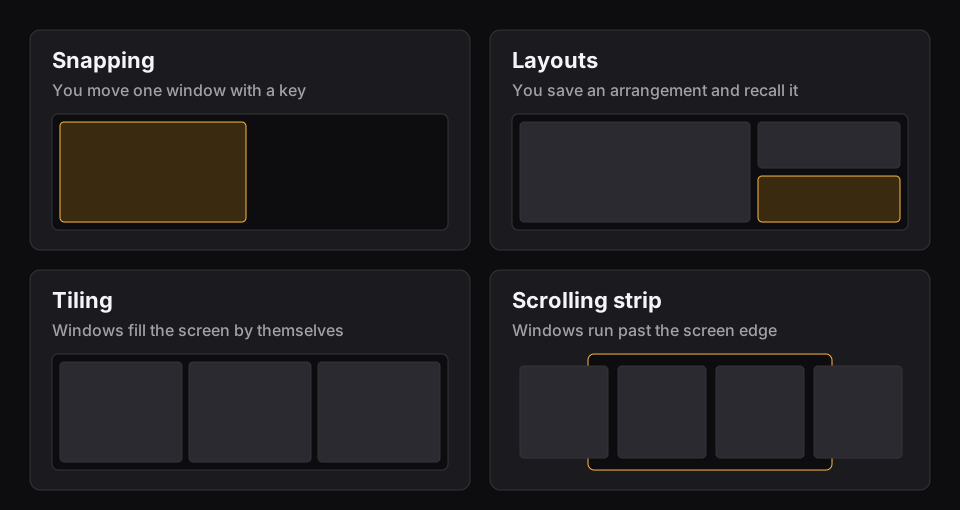
When Findow is the right pick instead
Findow suits a different person. It's for someone who liked i3's result, windows that sit in order and never overlap, but doesn't want to maintain it any more. There's no config file. You choose from a settings window or the menu bar.
Here's what you get with Auto arrange on:
- New windows take their place as they open, and the rest close the gap.
- You pick Grid, Columns, Rows or Focus, or draw your own grid of up to 6 columns by 4 rows. The keys are ⌃⌥⌘1 to ⌃⌥⌘5.
- ⌃⌥⇧← and ⌃⌥⇧→ swap a window with its neighbour.
- Extra windows can stack with tabs, which is a little like i3's tabbed layout.
- ⌃⌥⇧F floats a window, and ⌃⌥P pauses arranging.
- ⌃⌥Z fills the screen, and pressing it again returns.
- Focus follows mouse is available, and it's off by default.
Here's what doesn't carry over:
- There's no tree. You can't nest splits by hand, and a grid you draw is a fixed plan rather than a container layout.
- There are no binding modes, and no marks or scratchpad.
- There's no config file for your dotfiles. Shortcuts are changed in Settings. You can export workflows to a file, but that's for moving them to a new Mac.
- There's no i3-msg. Findow does accept links, so open findow://run/tidy or findow://mode/strip works from a script. That runs an action and nothing else. You can't query window state or subscribe to events.
- It doesn't have its own workspaces. Workflows bring back a saved set of apps on ⌃⌥1 to ⌃⌥9, which is a different thing from i3's instant workspace switch. Read about saved layouts and workflows to see the difference.
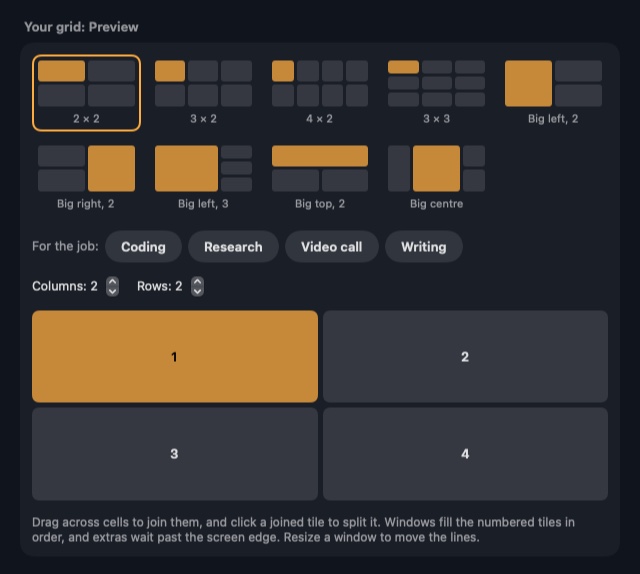
One i3 habit is worth solving whichever tool you pick. If you're used to jumping straight to a window, macOS's ⌘Tab will annoy you, because it switches apps. Our guide to switching windows on a Mac explains the built-in keys. AltTab is a free fix.
Findow is $19.99 once for one Mac, with a 14-day free trial and a 14-day refund. It needs macOS 14 or later, and so far it's only been built and run on Apple silicon with macOS 27.
Questions
Can I run i3 on a Mac?
Not as your Mac's window manager. i3 is built for X11, and macOS has its own window server. AeroSpace is the closest native option.
Can I reuse my i3 config in AeroSpace?
No. The ideas are similar, but AeroSpace uses TOML and you list every binding yourself, so you'll need to rewrite it.
Does AeroSpace need SIP turned off?
No. Its README says it doesn't require disabling System Integrity Protection.
Is Findow an i3 replacement?
Not for most i3 users. Findow has automatic tiling, but no tree, no binding modes, no scratchpad and no config file. AeroSpace is the better fit if you want those.
Is there a free i3 alternative for macOS?
Yes. AeroSpace, yabai, Amethyst and Rift are all free.
Try Findow free for 14 days
Every feature, with no account and no card. Then $19.99 once, with a 14-day refund. For macOS 14 or later.
Download Findow