niri config on macOS
By Sheik Ahamed, who makes Findow. Checked on 31 October 2026. All guides
Short answer: niri doesn't run on macOS, so your config.kdl has nothing to load it. It's a Linux Wayland compositor. You can rebuild most of that setup by hand in a Mac tool, either in Findow's settings or in a free app that uses a config file.
This guide is for people who already have a config.kdl and want the same feel on a Mac. It goes through the file section by section. For a list of keys, use our guide to niri keybindings on a Mac instead.
First decide: file or settings window?
This is the real choice. niri's appeal for many people is a text file that reloads on save and lives in dotfiles. Findow doesn't have that. It has no config file. You set things in Settings and the menu bar, on each Mac. If that's a deal-breaker, stop here and look at these:
- Paneru is the closest in spirit. It's free and reads a TOML file, such as $HOME/.paneru.toml, with [options] and [bindings] sections. It can use Lua instead, and reloads when you save. It's inspired by niri.
- PaperWM.spoon is set up in Lua through Hammerspoon. Our setup guide covers it.
Neither reads KDL, so you'd still rewrite your file. Findow suits you if you want the strip without keeping a file, and you also want its window search and workflows. Findow isn't a port of niri.
Section by section
This table shows where each niri option goes in Findow. Settings labels match the app.
| niri config | In Findow | What's different |
|---|---|---|
| gaps | Settings > Arrange > Gap between windows | Choose None, 4, 8, 10, 16 or 24 points |
| center-focused-column | Menu bar panel > Centre focused | Never, On overflow or Always, as in niri |
| always-center-single-column | No match | Use ⌃⌥C by hand |
| preset-column-widths | ⌃⌥R, Change width | Fixed at 25, 33, 50, 66 and 75 percent |
| default-column-width | No match | New columns start at half the screen |
| focus-ring | Settings > Arrange > Highlight | None, Border or Glow, plus Colour |
| struts | Settings > Arrange > Keep free | Top, bottom, left and right, up to 120 points |
| binds | Settings > Shortcuts | Several keys per command, no spawn actions |
| window-rule | Settings > Arrange > Apps | Leave an app alone, or fix its strip position |
| output | Menu bar panel > Arrange this display | On or off for each display |
| gestures | Settings > Arrange > Trackpad swipe | Off, Three fingers or Four fingers |
| animations | No match | Windows glide unless Reduce Motion is on |
| focus-follows-mouse | Menu bar panel > Focus follows mouse | On or off |
| warp-mouse-to-focus | Menu bar panel > Mouse follows focus | On or off |
Layout: what to set first
Most of what you'll notice is in niri's layout section. The default file sets gaps to 16, default width to half, and three presets. To get close:
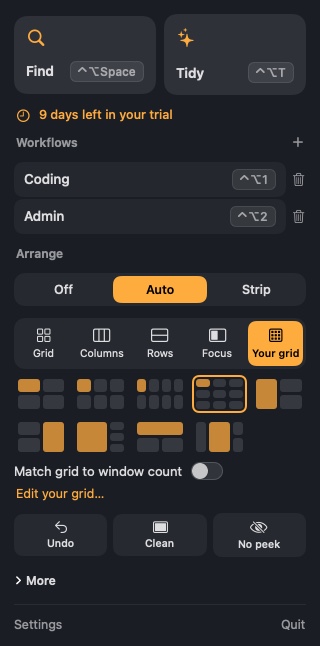
- In Settings > Arrange, pick Scrolling strip.
- Set Gap between windows to 16 points. Findow's own default is 10, and the gap applies at the screen edges too.
- In the menu bar panel, set Centre focused to match your center-focused-column value. In niri, "on-overflow" centers a column only when it and the previously focused column can't both fit. Findow's option is the same idea.
- Set Highlight to Border, then choose a Colour close to your active-color.
Struts need a closer look. In niri, left and right struts let the neighbouring window show at the edge of the screen. Findow's Keep free options reserve space at that edge, in steps of 24, 48, 80 or 120 points. That's useful for a Dock or a bar, but negative values aren't available.
Window rules
niri's rules can match an app-id with a regular expression, then set things such as open-floating, default-column-width or open-on-output. Findow's version is much smaller. In Settings > Arrange, each running app has a row with two controls:
- A switch to leave it alone, so Findow doesn't place it on the strip.
- A position from Any to 6, so that app always opens in that place on the strip.
There are no regular expressions, no rules by window title and no start size. To float one window rather than a whole app, press ⌃⌥⇧F.
Binds
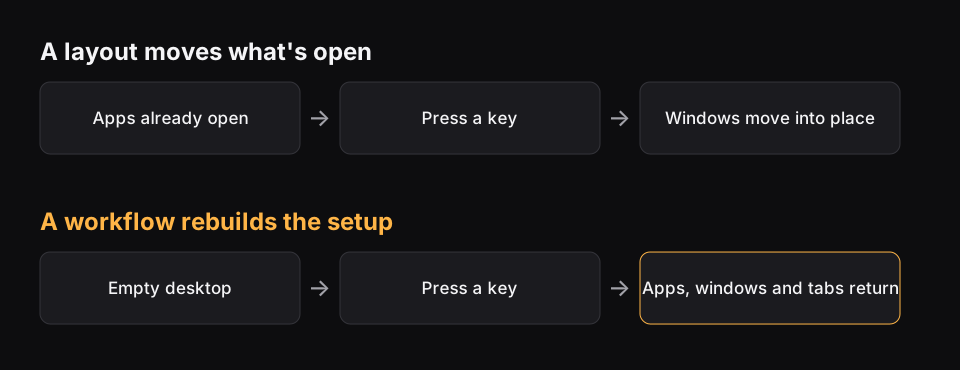
niri's spawn actions have no match, because Findow doesn't launch a command from a key. Everything else that has a Findow command can go in Settings > Shortcuts. If your file opens a set of apps, a Findow workflow is the nearest thing. It reopens apps, puts windows back and can switch by itself when its monitors connect. See how to save a window layout.
Outputs
niri's output blocks set the mode, scale and position of each monitor. On a Mac, those belong to System Settings > Displays. Findow can only turn arranging on or off for a display. It also remembers windows for each monitor setup, which is described in our guide to windows moving when you unplug a monitor.
Is there a way to script it?
Yes, a little. It's not a config file, but Findow answers to links. In a terminal, open "findow://mode/strip" turns the strip on, open "findow://run/cycleWidth" runs a command by name, open "findow://switch/Coding" switches workflow, and open "findow://layout/grid" sets a layout on the current display. You can call these from a shell alias, or from any launcher that opens a URL. It doesn't set options such as gaps, though, and there's nothing like niri's IPC for reading state.
What doesn't carry over at all
- Your file. KDL isn't read by anything here, and there's no import.
- Live reload. Settings apply right away, but there's no file to save.
- include lines and a split config. There's nothing to include.
- Layer rules and blur. macOS doesn't work that way, and Findow doesn't draw the desktop.
- A true off-screen strip. Waiting windows stay in the screen margin, with a tab showing how many.
Findow workflows can be exported to a file for your next Mac, but your arrange settings aren't part of a dotfile. If that's a problem, Paneru is the better pick. Not sure which app to use? Our roundup of the best scrolling window managers for Mac compares them.
Questions
Does niri run on macOS?
No. niri is a Wayland compositor for Linux, and its setup guide covers Linux only.
Can I use my config.kdl on a Mac?
No Mac app we found reads it. Paneru uses TOML or Lua, PaperWM.spoon uses Lua, and Findow uses a settings window.
Does Findow have a config file?
No. Settings live in the app. You can run commands with findow:// links, but they don't set options such as gaps.
What's the closest match to niri's preset widths?
Press ⌃⌥R on Findow's strip. It steps through 25, 33, 50, 66 and 75 percent, and those steps are fixed.
Can I set per-app rules like niri's window-rule?
Only a simple version. In Findow you can leave an app alone or fix its strip position.
Try Findow free for 14 days
Every feature, with no account and no card. Then $19.99 once, with a 14-day refund. For macOS 14 or later.
Download Findow