Your setup
The menu bar panel
The workflows, arrange modes and quick actions behind Findow's menu bar icon.
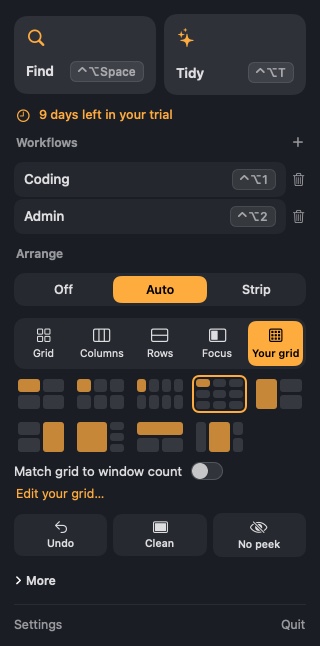
Click the Findow icon in the menu bar.
Workflows
Click a workflow to switch to it, or press the plus button to save your current setup. See Save a workflow.
Arrange
Choose Off, Auto or Strip. In Auto, pick a layout. Here you can also pause arranging, or turn the current display off.
Quick actions
- Undo: go back an arrangement.
- Clean: turn on Clean Space.
- No peek: turn on No peek.
- 3D: switch the switcher between a 3D style and the screen map.
At the bottom
Settings, Updates when there's one to install, and Quit.